Knowledge base — Connect & prepare your data
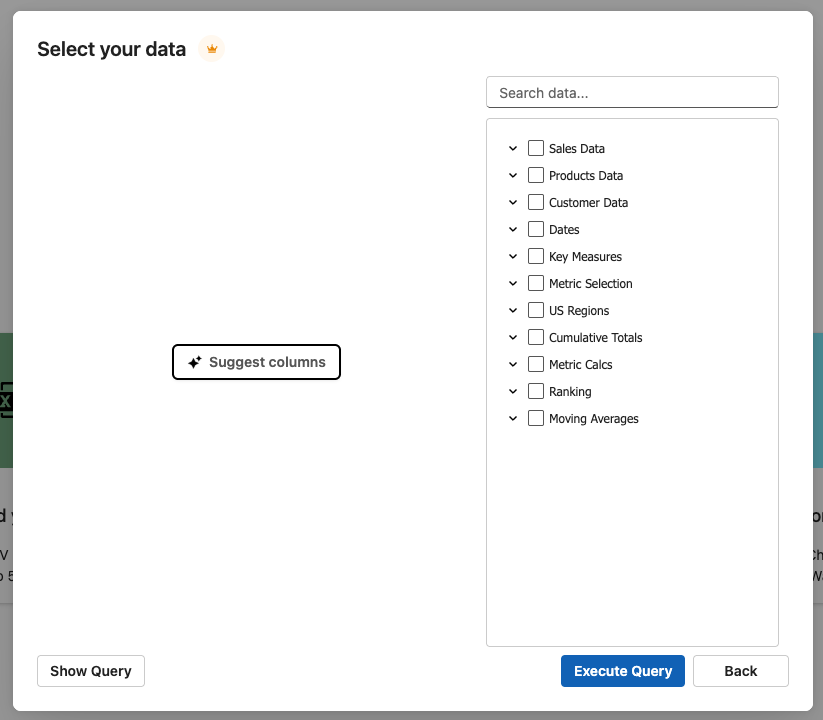
Zebra AI connects to your cloud-hosted Power BI semantic models in both Premium/PPU and non-Premium workspaces — with no DAX to write. You pick the tables, columns, and measures you want in a visual "Select your data" panel, and Zebra AI builds the query and pulls the data for you.
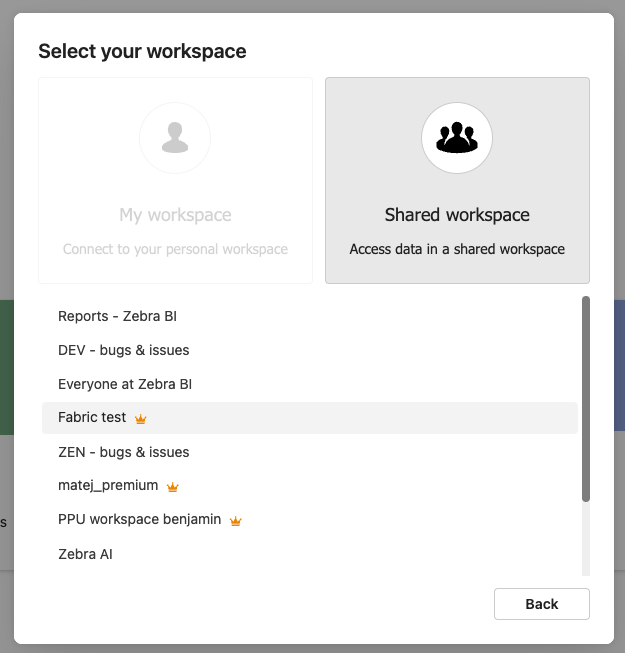
01 — Connect in any workspace
Do I need Premium — or to write DAX?
No on both counts. Zebra AI works with cloud-hosted Power BI semantic models in Premium/PPU and non-Premium workspaces, and you do not need to write DAX. Pick a workspace and dataset, and Zebra AI opens a visual selection panel where you choose what to bring in — it detects what your workspace supports and handles the query behind the scenes.
What changed
Non-Premium workspaces previously required writing a DAX query by hand. That's no longer the case — the visual "Select your data" experience now covers both workspace types, so connecting is the same simple flow everywhere.
02 — What data to select
What data should I select for the best analysis?
The data you choose sets the ceiling on your analysis. Zebra AI surfaces these best practices right in the selection panel:
| What to include | Why it helps |
|---|---|
| One date column | Year, month, and quarter are generated automatically; more history sharpens trend and variance detection |
| Actuals, plan, or forecast (where available) | Zebra AI compares them automatically and highlights where performance diverges from target |
| 5–10 measures (revenue, cost, margin) | Use raw values, not pre-calculated percentages — Zebra AI handles the calculations for you |
| Up to ~30 columns | Gives the sharpest analysis; up to 10M values load per query, so fewer columns allow more rows |
| "Suggest columns" (if you're unsure) | Generates a recommended set based on your data model |
Why actuals + plan or forecast matter
Variance is Zebra AI's signature output: actuals measured against a target. Include a plan, forecast, or prior-year column and Zebra AI charts the variance automatically, showing exactly where you're beating or missing target. Bring only one set of numbers and there's nothing to compare against.See how to prepare your data for the full picture.
03 — How to connect it
How do I connect a Power BI semantic model?
- Pick your workspace and dataset. Zebra AI opens the visual "Select your data" panel automatically.
- Choose your data. Select the tables, columns, and measures you want — or click "Suggest columns" for a recommended set.
- Run the selection. Zebra AI streams the results with progress and loads them into your story. You can edit your dataset connection to adjust the data selection.
- Save your dataset selection. Continue the same story or start a new one from the same in later sessions without reconfiguring.
04 — Security & data handling
Is my Power BI data safe?
- Read-only. Zebra AI performs only read operations against your Power BI data.
- Row-level security respected. You see only the data your Power BI permissions allow.
- Credentials aren't stored. Access tokens are used only to execute your requests and are not stored in our database.
05 — FAQ
Do I need Power BI Premium to connect?
No. Zebra AI supports both Premium/PPU and non-Premium workspaces for cloud-hosted semantic models.
Do I have to write DAX?
No. You choose columns and measures in the visual "Select your data" panel, and Zebra AI builds the query for you.
How many columns should I select?
Aim for up to about 30 columns for the sharpest analysis. Zebra AI loads up to 10 million values per query, so fewer columns allow more rows of history.
Should I include percentages or raw values?
Use raw values such as revenue, cost, and margin. Zebra AI calculates ratios and percentages for you, so pre-calculated fields aren't needed.
Why should I include plan or forecast data?
So Zebra AI can run variance automatically — comparing actuals against your target and highlighting where you diverge. Without a comparison column, there's nothing to measure variance against.
Can I reuse my selection later?
Yes. Save your dataset selection and continue the same story or add a new story from it in future sessions without reconfiguring.
06 — Next steps
Turn your Power BI model into a variance story
Connect a semantic model, select your actuals and a comparison base, and let Zebra AI build the dashboard.
Start for freeLast reviewed: 29 July 2026